No section matches that filter.
Before you plug it in pp. 1, 6, 32, 108, 113
AC 100 V, 50/60 Hz only. The manual states this is a Japan-only model and must not be run on any other voltage (fire and shock risk).
DVD: region 2 or ALL, NTSC only. Video CDs must also be NTSC. A disc in another TV system gives a broken picture.
Not in the manual, for use in Europe: on 230 V mains the unit needs a step-down transformer to 100 V; rated consumption is 70 W, so allow comfortable headroom above that. European DVDs are region 2 but PAL, so they fall outside what the manual supports. The FM tuner covers 76–90 MHz only, so of the European band (87.5–108 MHz) just the lowest 2.5 MHz is reachable.
- The disc slot is a slot loader. Insert discs at the centre of the slot with the label side to the right. 8 cm CDs must be centred or they will not be pulled in.
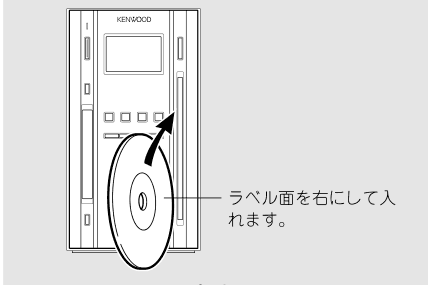
Disc loading (p. 34). The note reads: insert with the label side to the right. - Do not load transparent discs (the loader detects discs optically), shaped discs, cracked or warped discs, or discs with stuck-on labels or stabiliser rings. Printable CD-R/DVD-R label surfaces can stick and jam.
- Discs and MDs cannot be inserted or ejected in standby. Do not force them.
- Memory: the clock is lost the moment the plug is pulled. Presets, volume, tone, timer and display settings survive about one day unplugged.
- Condensation after a move from cold to warm stops the unit working. Leave it a few hours.
- Before transporting: remove the disc and MD, press MD ▶/II, then DVD/CD ▶/II, wait for the display to change, wait a few seconds more, then power off.
- Never use lens cleaner discs or contact cleaner spray.
Microcomputer reset
If keys stop responding, the display shows nonsense, or a disc will not eject (LOCKED): unplug the mains lead, hold the power key on the unit, and plug it back in while holding. This returns everything to factory settings, including the parental password.
Connections pp. 10–16
Make every connection with the mains lead unplugged.
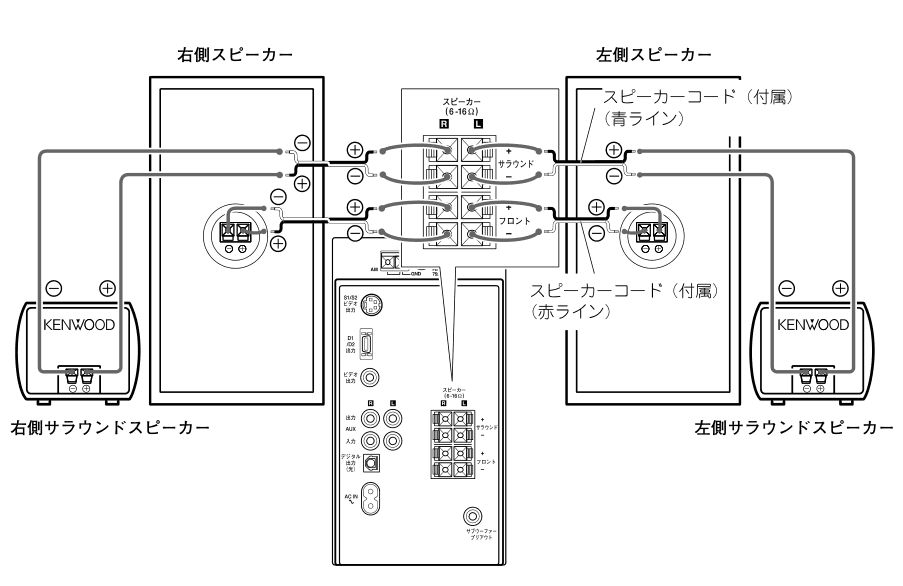
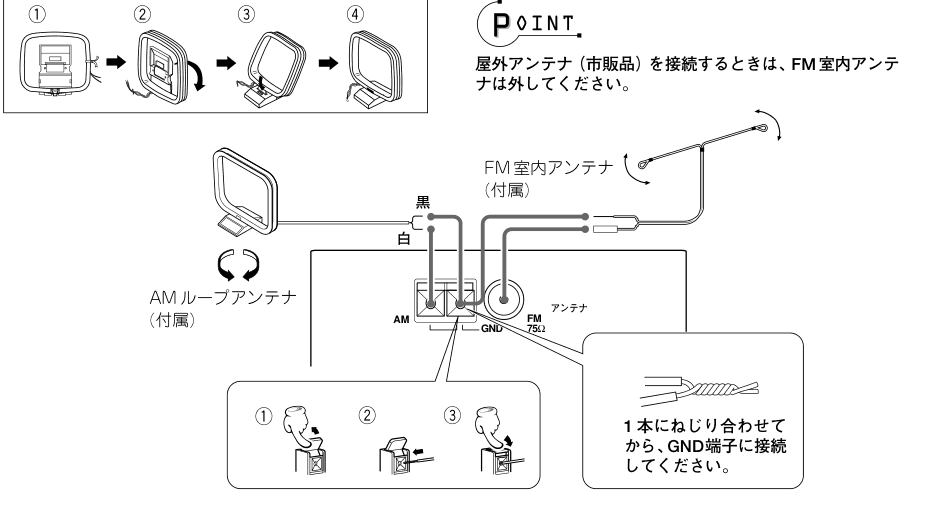
| Terminal | Use |
|---|---|
| Front speakers | Supplied cables with the red line. Never short + and −. |
| Surround speakers | Supplied cables with the blue line. They only produce sound while V.F.S. is on. |
| Subwoofer pre-out | For an active subwoofer (sold separately). |
| FM 75 Ω / AM / GND | Supplied indoor FM wire and AM loop. Remove the indoor FM wire if you fit an outdoor antenna. |
| Video out | Composite, supplied cable. |
| S1/S2 video out | S-video. Set the signal type under S端子モード in the set-up menu. |
| D1/D2 out | Japanese D-terminal (component, 525i/525p). Do not connect another video output at the same time. Switch with PROGRESSIVE/INTERLACE on the remote. |
| Digital out (optical) | DVD/CD source only. MD audio is not output. |
| AUX in / out | Analogue RCA, for a cassette deck or similar. |
| phones | Stereo mini jack. Mutes the speakers. |
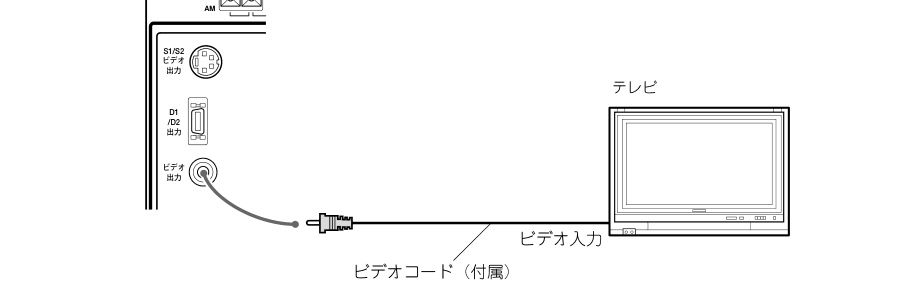
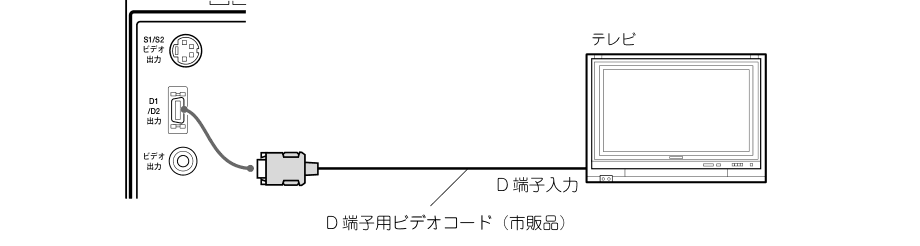
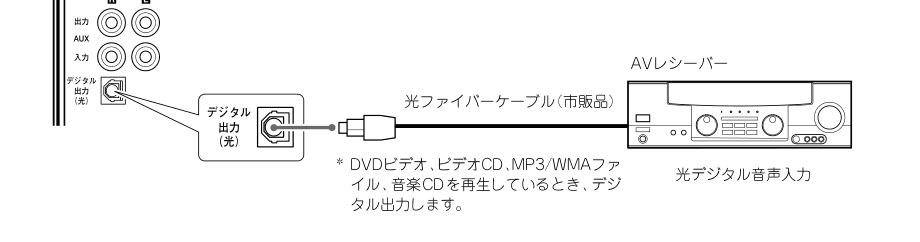
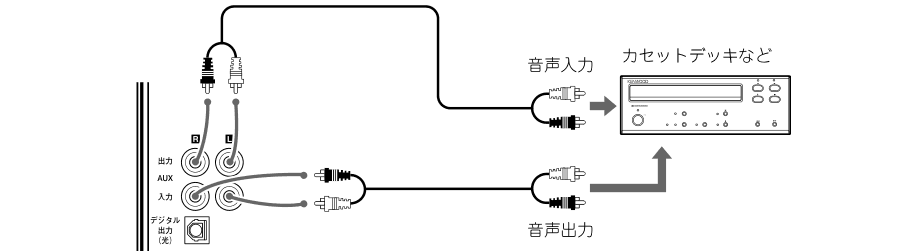
- Connect the video straight to the TV. Through a VCR, copy protection disturbs the picture.
- Set TV アスペクト (4:3 or 16:9) to match the TV.
- The unit downmixes Dolby Digital to two channels. It does not decode DTS: the DTS indicator lights but the unit is silent, and the analogue outputs may carry noise. Use the optical output into an external DTS decoder.
- Optical out to an AV receiver: leave the digital outputs on bitstream. To a digital recorder: set Dolby Digital and MPEG output to PCM.
Keys and display pp. 17–20
Main unit
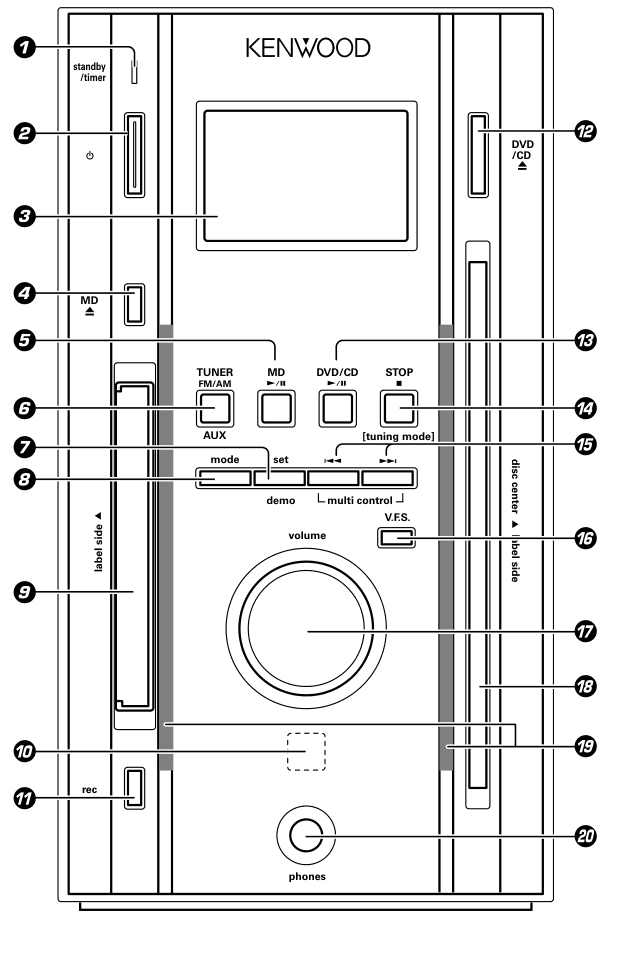
- standby/timer indicator
- Power
- Display
- MD ⏏
- MD ▶/II
- TUNER FM/AM, AUX
- set / demo
- mode
- MD slot
- Remote sensor
- rec
- DVD/CD ⏏
- DVD/CD ▶/II
- STOP ■ / tuning mode
- multi control ⏮ ⏭
- V.F.S.
- volume knob
- Disc slot
- Disc slot light
- phones jack
Almost every setting on the unit uses the same three keys: mode to open the menu, multi control ⏮ ⏭ to choose, set to confirm.
Remote
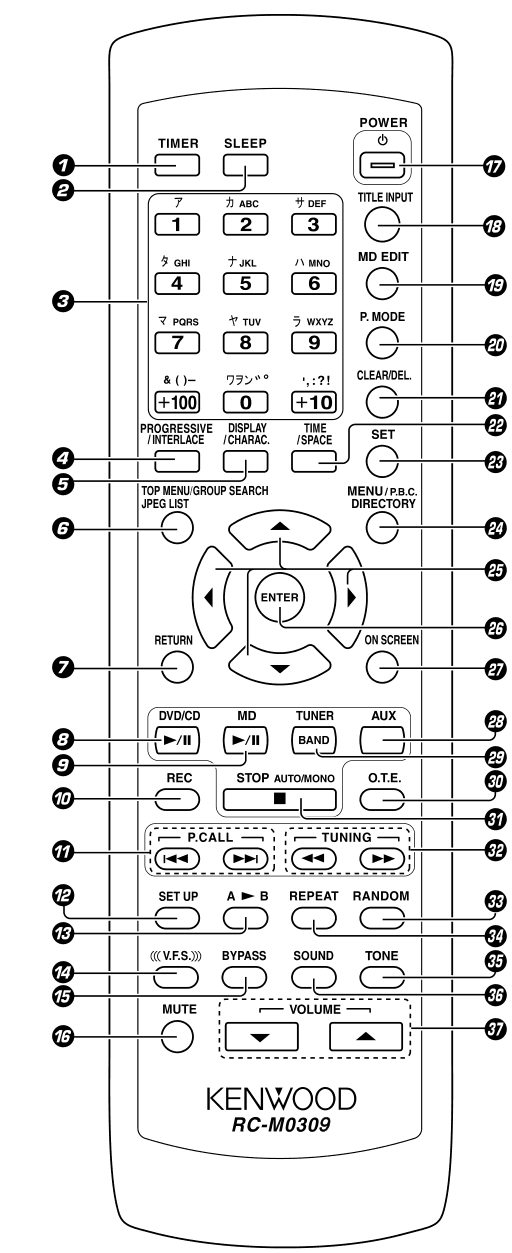
- TIMER
- SLEEP
- Number and character keys
- PROGRESSIVE/INTERLACE
- DISPLAY / CHARAC.
- TOP MENU / GROUP SEARCH / JPEG LIST
- RETURN
- DVD/CD ▶/II
- MD ▶/II
- REC
- P.CALL ⏮ ⏭
- SET UP
- A↔B
- V.F.S.
- BYPASS
- MUTE
- POWER
- TITLE INPUT
- MD EDIT
- P.MODE
- CLEAR/DEL.
- TIME / SPACE
- SET
- MENU / P.B.C. / DIRECTORY
- Cursor keys
- ENTER
- ON SCREEN
- AUX
- TUNER/BAND
- O.T.E.
- STOP ■ / AUTO/MONO
- TUNING ◀◀ ▶▶
- RANDOM
- REPEAT
- TONE
- SOUND
- VOLUME ▼ ▲
| Key | Function |
|---|---|
| P.CALL ⏮ ⏭ | Skip track / chapter / file; call radio presets; choose items while editing. |
| TUNING ◀◀ ▶▶ | Fast search; tune the radio; move the cursor in title entry. |
| Number keys, +10, +100 | Direct selection. Track 23 is +10 +10 3; track 40 is +10×4 then 0. |
| P.MODE | Programme and group play modes (while stopped). |
| RANDOM REPEAT A↔B | Play modes. |
| TIME / SPACE | Cycle the time display; space in title entry. |
| DISPLAY / CHARAC. | Cycle title, time, clock; character set in title entry. |
| TOP MENU / GROUP SEARCH / JPEG LIST | One key, function depends on the source. |
| MENU / P.B.C. / DIRECTORY | One key: DVD menu, Video CD playback control, folder browser. |
| Cursor keys, ENTER, RETURN | Menus on the TV screen. |
| ON SCREEN SET UP | On-screen display bars; DVD set-up menu. |
| MD EDIT TITLE INPUT CLEAR/DEL. SET | MD editing and titling. |
| O.T.E. REC | One-touch disc-to-MD recording; record. |
| TONE SOUND BYPASS V.F.S. MUTE | Sound controls. |
| TIMER SLEEP | Timer on/off selection; sleep timer. |
| STOP ■ / AUTO/MONO | Stop; radio auto or manual tuning. |
Remote range is about 6 m, 30° either side. Two AA cells. Leave about a second between key presses.
Display indicators
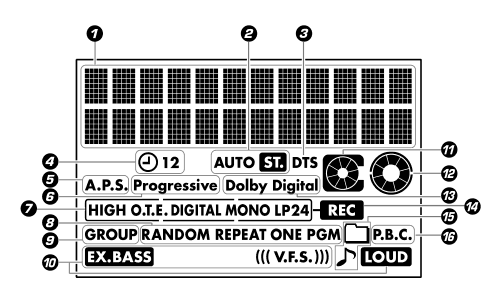
- Text area
- Radio: AUTO, ST.
- DTS
- Timer
- A.P.S.
- Progressive
- MD recording: HIGH, O.T.E., DIGITAL, MONO, LP2, LP4
- Play mode: RANDOM, REPEAT, ONE, PGM
- GROUP
- Sound: EX.BASS, V.F.S., LOUD
- MD loaded
- Disc loaded
- Dolby Digital
- REC
- MP3/WMA and JPEG (folder, note)
- P.B.C.
AUTO ST. radio · HIGH O.T.E. DIGITAL MONO LP2 LP4 REC MD recording · RANDOM REPEAT ONE PGM GROUP play modes · EX.BASS LOUD V.F.S. sound · A.P.S. auto power save · P.B.C. Video CD.
Basic operation pp. 21–26
- Power: the power key, or press any source key in standby (DVD/CD ▶/II, MD ▶/II, TUNER, AUX) and the unit switches on and starts that source.
- Demo display: appears after about 5 seconds idle with disc and MD stopped. Press demo during the demo to turn it off. It comes back after any power cut.
- Volume: 0–39, then MAX. MUTE toggles.
- SOUND (remote): cycles EX.BASS (bass boost at any volume) → LOUDNESS (bass and treble lift for low volume) → off.
- TONE (remote): TONE, adjust BASS with ⏮ ⏭, TONE again for TREBLE, TONE to finish. Range −8 to +8. Disabled while V.F.S. is on.
- BYPASS (remote): sends the source past the SOUND, TONE and V.F.S. circuits.
- External source: AUX, then start the other device. Match its level under AUX INPUT (−3 to +3); this also changes the MD recording level.
Setting the clock (unit only)
- mode → TIME ADJUST → set
- 12 HOUR or 24 HOUR → set
- Day of week → set
- Hour → set, minute → set
Timers do not work until the clock is set. In standby, STOP ■ shows day and time for 5 seconds. Redo the clock after any power interruption.
Radio pp. 27–30
- Tune: select the band with TUNER FM/AM (remote TUNER/BAND). tuning mode on the unit or AUTO/MONO on the remote switches between auto tuning (AUTO lit, stereo, stops at each station) and manual (step by step, FM in mono). Then ⏮ ⏭ on the unit or ◀◀ ▶▶ on the remote. On the unit, press ⏮ ⏭ while AUTO or MANUAL is still showing.
- Store a preset (remote): tune the station, ENTER, number 1–40, ENTER.
- Recall: ⏮ ⏭ or the number keys.
- Delete (remote): recall the preset, CLEAR/DEL., ENTER. Later presets move up one. Preset 40 cannot be deleted.
- DISPLAY cycles station name, frequency, clock.
Japan only: the auto preset (mode → ケンメイセッテイ → pick a prefecture → set) fills up to 40 presets and labels FM stations from a built-in list of Japanese broadcasters. It overwrites existing presets. Outside Japan use manual presets.
DVD and CD playback pp. 31–45, 53
What it plays
| Plays | Does not play |
|---|---|
| DVD-Video (region 2/ALL, NTSC) · Video CD 1.1 and 2.0 · audio CD · finalised CD-R/RW with audio, MP3, WMA, JPEG or Video CD · finalised DVD-R/RW and DVD+R/RW in video mode | SACD · DVD-Audio · SVCD · DVD-RAM · DVD-RW in VR mode · unfinalised or packet-written discs · data discs. CDV, CD-G and CD-EXTRA play audio only. |
- MP3: 32–320 kbps, 32/44.1/48 kHz. WMA: 48–192 kbps. JPEG: baseline only, up to 7680 × 7680; no progressive JPEG.
- ISO 9660 level 1 or 2. At most 255 folders and 1743 files. Files need
.MP3,.WMA,.JPGextensions. Prefix names with 01, 02… to fix the play order. - Tag display is ID3 v1.x, Latin letters and digits only. Copy-protected WMA shows PROTECTED and is skipped.
Transport
| Action | Keys |
|---|---|
| Play / pause | DVD/CD ▶/II |
| Stop | STOP ■. For DVD, Video CD, MP3/WMA and JPEG the first press remembers the position (resume); the second press stops fully. |
| Skip | ⏮ ⏭. One press of ⏮ returns to the start of the current item. |
| Fast search | ◀◀ ▶▶ during play (remote), five speeds. |
| Slow motion | Pause, then ◀◀ ▶▶, five speeds, no sound. No reverse slow on Video CD. |
| Direct select | Number keys. On a DVD: titles while stopped, chapters while playing. |
| Browse folders | DIRECTORY, cursor ▲ ▼, ENTER. |
| Time display | TIME cycles track elapsed, track remaining, disc elapsed, disc remaining. |
| Eject | DVD/CD ⏏ on the unit. |
Play modes (remote)
- Programme (CD, Video CD): STOP ■ → P.MODE until PGM lights → track number → SET → repeat for up to 32 tracks → DVD/CD ▶/II. While stopped, CLEAR/DEL. removes the last entry and P.MODE clears everything. Eject or power-off also clears it.
- Random: RANDOM with PGM off. ⏭ jumps to another track. Stops after one pass.
- Repeat: REPEAT cycles one (REPEAT ONE; chapter on DVD) → all (title on DVD; folder, then whole disc, on MP3/JPEG) → off. Pressed during random play it repeats the random pass.
- A–B repeat: A↔B at the start point, again at the end point, again to cancel. Not available in programme or random play.
Menus
- DVD: TOP MENU or MENU, then cursor keys and ENTER, or a number key.
- Video CD with playback control: menus run automatically. To use programme, random, repeat or recording, turn it off first: STOP ■ then P.B.C. (toggles). In menus ENTER selects, RETURN goes up a level, ⏮ ⏭ change page.
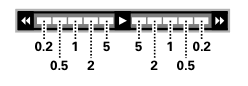
- JPEG: JPEG LIST shows thumbnails; pick with the cursor and ENTER. Slides advance every 10 seconds by default; during the show ◀◀ ▶▶ step the interval through roughly 5, 2, 1, 0.5 and 0.2 seconds (scale below), and cursor ◀ ▶ rotates by 90°. With MP3/WMA on the same disc the picture stays up while the music plays.
On-screen display and picture pp. 46–52
ON SCREEN shows a bar on the TV. Cursor ▲ ▼ switches between the MAIN, SOUND and VISUAL bars, ◀ ▶ picks an icon, ENTER opens its list. Not available while a DVD menu is showing.

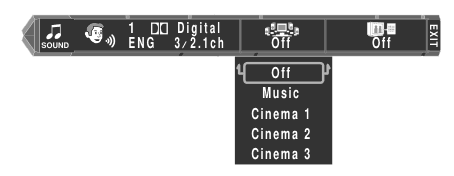
| Bar | Icons |
|---|---|
| MAIN | Title, chapter (or track, folder, file) · time display, including Time Search: type the time as digits, 12 min 34 s is 1234 · memory play (Set stores a point in a numbered slot, Play jumps to it) · repeat (Off, Chapter/Track, Title/Disc, A–B) · EXIT |
| SOUND | Audio language or Video CD channel · V.F.S. mode · Cinema Voice (lifts dialogue on Dolby Digital multichannel discs) |
| VISUAL | Subtitle language · angle · picture adjustment · tag display on/off for MP3/WMA |
Picture adjustment
Separate settings for Interlace and Progressive. Use the TV's own controls first if it has them.
- Presets: Normal, Fine (sharper edges), Soft (less noise), Cinema.
- User Mode 1 and 2: Contrast, Color, Sharpness (−7 to +7), Brightness (0 to +15). Progressive adds I/P conversion: AUTO (default), Film, Video.
- Noise Reduction: Mosquito NR (On 2, On 1, Off), Block NR, 3D NR, Dot NR. 3D and Dot cannot both be on. Shared between interlace and progressive, as is GAMMA.
- If a progressive picture looks wrong on a particular disc, switch to interlace with PROGRESSIVE/INTERLACE.
V.F.S. surround pp. 54–55
V.F.S. cycles the modes. The surround speakers are silent in SURROUND OFF.
| Mode | Meant for |
|---|---|
| MUSIC | Music discs, CD included. Works with the surround speakers placed anywhere. |
| CINEMA 1 | 5.1 DVD soundtracks, surround speakers placed beside the front pair. |
| CINEMA 2 | Older films without a 5.1 track; stronger effect when the speakers cannot be spread apart. |
| CINEMA 3 | Surround speakers set wide apart or behind the listener. |
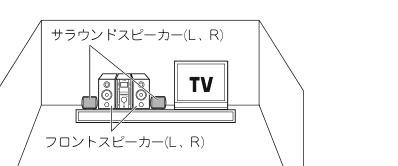
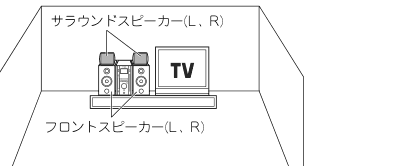
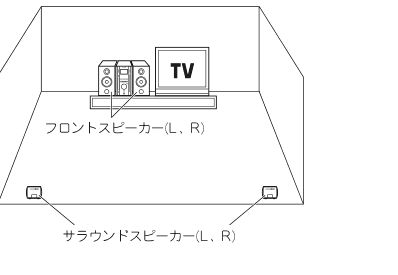
Surround level: mode → SURR. LEVEL → set → −10 to +10 → set. Volume and balance also move the surround channels.
MD playback pp. 56–64
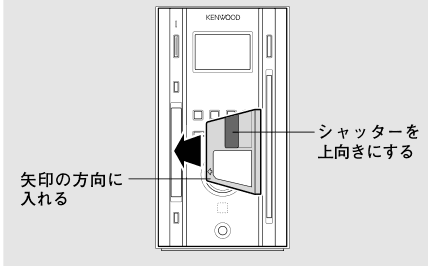
- Insert the MD in the direction of its arrow, shutter edge up. MD ▶/II plays and pauses, STOP ■ stops, ⏮ ⏭ skip, hold ◀◀ ▶▶ to search, number keys select (+100 available), MD ⏏ on the unit ejects.
- MDLP is supported. LP2, LP4 or MONO shows the mode of the track playing; nothing lit means standard stereo.
- TIME cycles: track elapsed, track remaining, disc or group elapsed, total remaining, and recordable time left (marked R).
- An untitled disc shows dots; an empty one shows BLANK DISC.
Group play (remote, stopped)
P.MODE until GROUP lights → GROUP SEARCH → cursor ▲ ▼ to pick the group → ENTER → MD ▶/II. To leave, press P.MODE twice while stopped.
Programme, random, repeat
Same keys as for CD: programme up to 32 tracks, RANDOM, REPEAT (one → all → off). In group mode, random and repeat stay inside the group. Unlike CD, STOP ■ does not cancel repeat on MD.
MD recording pp. 65–75
| Mode | On an 80-minute disc | Plays on non-MDLP machines |
|---|---|---|
| STEREO | 80 min | Yes |
| MONO | 160 min | Yes |
| LP2 | 160 min, stereo | Silent |
| LP4 | 320 min, stereo | Silent |
- Set the mode and other options in the mode menu first (REC MODE, REC INPUT, TRACK MARK, REC LEVEL, TEXT COPY, GROUP MAKE).
- Only audio CD records digitally. DVD, Video CD, MP3 and WMA always record in analogue at normal speed.
- SCMS allows one digital generation. If a CD refuses (SCMS), set REC INPUT to analog.
- The LP stamp puts LP: at the front of LP2/LP4 track titles so non-MDLP players show why the track is silent.
- Auto track marks: from the CD's own track data in digital; at track changes in analogue; after about 2 seconds of silence from AUX; every 5 or 10 minutes from the radio. In MANUAL, press MD EDIT during recording to drop a mark.
- Limits: 255 tracks and 99 groups per disc.
- Never cut the power while WRITING is showing. The recording or edit is lost.
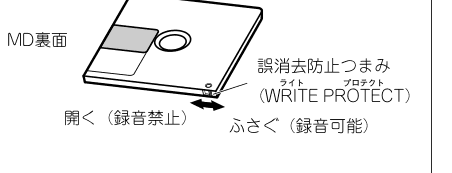
- The write-protect tab on the MD must be closed to record.
Basic recording (unit)
- Insert a recordable MD.
- Ready the source: load a disc and pause it with DVD/CD ▶/II, or tune a station, or press AUX.
- rec: REC blinks (record-pause).
- rec again, then start the source.
MD ▶/II pauses and resumes. STOP ■ stops both MD and disc.
Synchro recording from a point on a CD
Pause the CD where you want to start → rec → DVD/CD ▶/II. Both start together and stop at the end of the CD.
O.T.E. one-touch recording
- Load the MD and the disc. Press DVD/CD ▶/II then STOP ■.
- mode → O.T.E. SPEED → set → HIGH (4×, audio CD with digital input only) or NORMAL → set → MELODY ON or OFF (chime when finished) → set.
- mode → O.T.E. START → set.
- Whole disc: start from stop. One track: play that track first, then do step 3; it rewinds to the track start and records it. A programme: build the programme, leave it stopped, then step 3.
- Shortcut: once the speed is set, the remote's O.T.E. key does step 3 in one press.
- MP3/WMA folder: with the disc stopped, DIRECTORY, choose the folder, then O.T.E.. Only files directly in that folder are recorded; JPEGs are skipped.
- At 4× the speakers are silent. A track recorded at 4× cannot be recorded at 4× again for 74 minutes (Wait with a countdown); record at normal speed instead.
- DVD audio can only be recorded one track at a time, and some discs refuse.
MD editing pp. 76–88
Remote only, source set to MD. Leave group, programme and random modes first. The pattern is always:
MD EDIT → ⏮ ⏭ to choose TRACK, GROUP or CANCEL → SET → choose the operation → SET → choose tracks, SET after each → ENTER to execute.
The display shows EDIT NOW then COMPLETE, or CAN'T EDIT. Edits are written to the disc when you eject it. Twenty seconds without a key press abandons the edit; MD EDIT also backs out.
| Operation | When | Steps after choosing it |
|---|---|---|
| MOVE | Stopped or playing | Track to move → SET → destination number → SET → ENTER. During play it acts on the current track. |
| DIVIDE | Playing only | Press MD EDIT at the split point → DIVIDE → SET → SET. About 3 seconds from the point loops; nudge it with ⏮ ⏭ (−31 to +31) → SET → ENTER. |
| COMBINE | Playing only | While one of the two tracks plays: choose the track to join → SET → ENTER. Tracks in different recording modes, or NetMD check-outs, cannot be joined. |
| ERASE | Stopped or playing | Stopped: choose ALL ERASE or a track number → SET → ENTER. Playing: erases the current track. |
| Group START | Stopped | First track → SET → last track → SET → ENTER. Tracks must be consecutive and not already in a group. |
| Group EDIT | Stopped | Choose the group → SET → new first track → SET → new last track → SET → ENTER. |
| Group CANCEL | Stopped | Choose a group or CANCEL ALL → SET → ENTER. Tracks are kept; only the grouping goes. |
Undo
MD EDIT → CANCEL → SET → ENTER restores the disc to how it was when inserted. This is no longer possible once the disc has been ejected or anything new has been recorded.
Erasing every track in a group removes the group. A moved or divided track takes the group of its neighbours. Groups made here can display as stray digits in the disc title on players without group support.
MD titles pp. 89–92
- TITLE INPUT (not in programme or random mode).
- ⏮ ⏭ to choose DISC or a track (T001…) → SET.
- Enter the text, then ENTER to store it. Repeat from step 2 for more.
- TITLE INPUT to finish, then eject to write the disc.
For a group title, enter group play mode and select the group first; the list then starts with G01.
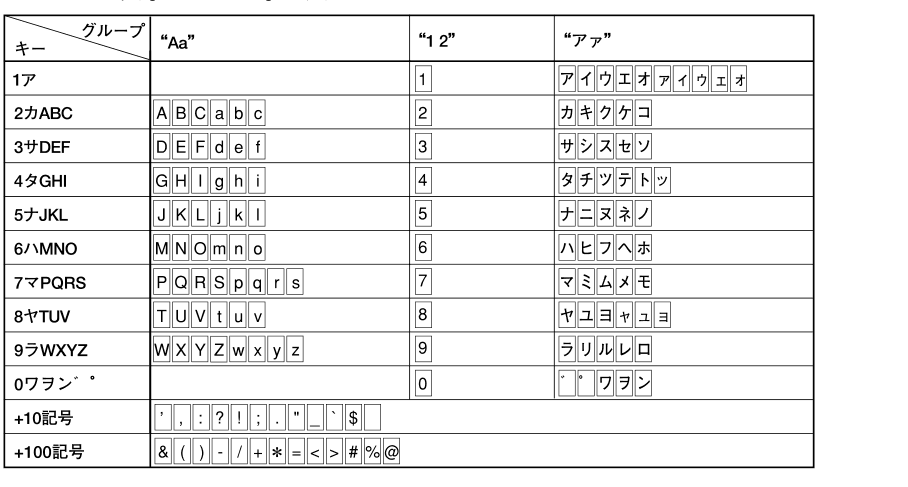
- CHARAC. cycles the character set: letters and symbols, digits and symbols, half-width katakana.
- Number keys are multi-tap: 2 gives A, B, C, a, b, c. +10 and +100 hold the symbols. SET confirms each character.
- ◀◀ ▶▶ move the cursor, CLEAR/DEL. deletes, SPACE inserts a space.
- Limits: 80 characters per track, 1792 per disc (fewer with katakana).
- Avoid
/,-and;in disc titles on grouped discs; group data is stored in the same field.
Timers pp. 93–98
Sleep (remote): SLEEP steps 10, 20 … 90 minutes, then off. One press later shows the time left.
PROG.1 and PROG.2 (unit)
Set the clock first. Load the disc or MD the timer will use.
- mode → TIMER SET → set → PROG.1 or PROG.2 → set → ON → set.
- Days: Everyday, a single weekday (then ONETIME or EVERY WEEK), Mon-Friday, Tue-Saturday, or Sat,Sunday.
- On time, then off time (hour, then minute).
- Type: PLAY, AI PLAY (volume fades up to the set level) or REC.
- Volume. For an unattended recording set it to 0.
- Source: TUNER (then the preset number), DVD/CD, MD, AUX. For REC only tuner or AUX, followed by the recording mode.
- Switch to standby. The standby/timer lamp turns green.
- Keep the two programmes at least a minute apart. Start a radio recording about a minute early to avoid clipping the opening.
- Remote TIMER cycles which programmes are armed: 1, 2, both, none. Settings are kept when disarmed.
- Lamp blinking green means the power was interrupted: reset the clock and re-arm.
DVD set-up menu pp. 99–107
Source DVD/CD, stopped. SET UP → cursor ▲ ▼ to MAIN, SOUND or VISUAL → ENTER → item → ENTER → value → ENTER. RETURN backs out.
The menus arrive in Japanese. To switch them to English: SET UP → VISUAL → プレーヤーメニュー言語 (first item) → 英語.
| Page | Item | Options (default in bold) |
|---|---|---|
| MAIN | 視聴制限 Parental level | 8 no limit, 7–1, 0 block all. Setting a level asks for a 4-digit code. Also 暗証番号変更 change code, 一時解除 temporary release. |
| MAIN | TV アスペクト | 4:3, 16:9 |
| MAIN | TV モード | Letterbox, Pan & Scan (for a 4:3 TV) |
| MAIN | OSD 位置 position | Normal (top), Cinema (lower) |
| MAIN | オンスクリーンメッセージ | On, Off |
| MAIN | IPB 表示 | On, Off (shows the MPEG frame type when paused) |
| SOUND | PCM ダウンサンプリング変換 | On (96 kHz output converted to 48 kHz/16 bit), Off |
| SOUND | Digital out: DOLBY DIGITAL | Bitstream, PCM |
| SOUND | Digital out: DTS | Bitstream, Off |
| SOUND | Digital out: MPEG | Bitstream, PCM |
| SOUND | サーチ音声 search audio | On, Off |
| SOUND | ダイナミックレンジコントロール | Wide, Normal, Midnight (Dolby Digital only) |
| VISUAL | プレーヤーメニュー言語 player menus | English, French, Spanish, German, Italian, Japanese, Chinese (simplified, traditional) |
| VISUAL | ディスクメニュー言語 disc menus | English, Japanese, other by code |
| VISUAL | 音声言語 audio | Original, English, Japanese, other by code |
| VISUAL | 字幕言語 subtitles | Auto (subtitles only when the audio is not in the chosen language), English, Japanese, other by code |
| VISUAL | スチルモード still mode | Auto, Frame (sharper, may shimmer), Field (steady, coarser) |
| VISUAL | S端子モード | Normal, S1, S2 |
Language codes for "other": English 6978 · German 6869 · French 7082 · Italian 7384 · Spanish 6983 · Japanese 7465.
If the digital output feeds anything that is not a matching decoder, use PCM or Off. Bitstream into the wrong device produces loud noise that can damage speakers.
Messages and faults pp. 113–117
| Display | Meaning and action |
|---|---|
| BLANK DISC | Nothing recorded on the MD. |
| NO TRACKS | The MD has a disc title but no tracks. |
| READING | Reading the disc's table of contents. Takes longer on a brand-new MD or one with many groups. |
| MD WRITING | Saving recording or edit data. Do not cut the power. |
| DISC FULL | No space left, or the track limit is reached. |
| PROTECTED | MD write-protect tab is open, or the track is a NetMD check-out. On a data disc: copy-protected WMA. |
| CAN'T EDIT | Track too short, programme or random mode active, or a pre-recorded MD. |
| UTOC ERROR | The MD's index is damaged. Run ALL ERASE; if that fails, replace the disc. |
| SCMS | Source forbids a digital copy. Record in analogue. |
| Wait | Same track already recorded at 4× within the last 74 minutes. |
| BUFFER OVER | More than 200 tracks recorded at high speed within 74 minutes. |
| PGM FULL | Programme already holds 32 tracks. |
| TEXT FULL / TITLE FULL | CD-TEXT too large to show / MD title character limit reached. |
| NO PLAY | Wrong region code, unreadable disc, or unsupported format. |
| LOCKED | Disc will not eject. Do the microcomputer reset. |
| Blinking ? | Asking you to confirm a setting or edit. |
Common faults
- standby/timer lamp blinks red, no sound: the speaker leads are shorted. Power off and reconnect. If it persists, stop using the unit and have it serviced.
- Lamp blinks green, or the clock is frozen and blinking: power was interrupted. Set the clock again.
- No sound: check volume, MUTE, and whether headphones are plugged in.
- No picture: TV input, cables, and that the disc's TV system matches the TV.
- Prohibition icon on screen: the disc does not allow that operation at that point.
- Forgot the parental code: do the microcomputer reset.
- AUX recording has wrong track numbers: adjust AUX INPUT, or set TRACK MARK to MANUAL.
- MD quirks that are normal: free time does not grow after erasing short tracks; elapsed plus remaining does not add up exactly; brief dropouts when searching across edited tracks; some edited tracks cannot be combined.
Specifications back cover
| Item | Value |
|---|---|
| Power supply | AC 100 V, 50/60 Hz |
| Rated consumption | 70 W; standby 0.14 W or less |
| Amplifier output | Front 18 W + 18 W, surround 6 W + 6 W (JEITA, 6 Ω) |
| Speaker terminals | 6–16 Ω |
| Subwoofer pre-out | 2 V / 750 Ω |
| AUX | Out 200 mV / 200 Ω; in 200 mV / 22 kΩ |
| FM tuner | 76–90 MHz, 75 Ω unbalanced |
| AM tuner | 531–1,629 kHz |
| MD | ATRAC / ATRAC3 |
| Video | NTSC. Composite 1 Vp-p (75 Ω); S-video; component via D-terminal |
| Optical out | −21 to −15 dBm, 660 nm |
| Main unit (RMD-ES9DVD) | 115 × 210 × 343 mm (W × H × D), 5.7 kg |
| Front speakers (LS-ES9) | 2-way bass reflex, 80 mm woofer, 25 mm tweeter, 6 Ω, 20 W max; 115 × 210 × 245 mm, 1.9 kg each; magnetically shielded |
| Surround speakers | Full-range, sealed, 6 Ω, magnetically shielded |
What was left out
- The general safety pages (pp. 5–9) beyond the points listed at the top.
- The prefecture-by-prefecture FM station name list (p. 28) and the full disc language code table (p. 107).
- The glossary, licence notices and Japanese recording-levy notice (pp. 109–112).
- Step-by-step key illustrations, the set-up menu screenshots and the timer flow charts; the text here covers the same steps.
- Warranty terms and the Japanese service network (pp. 118–119).